Privacy8 min readUpdated
Attio email privacy: a setup for investment funds
By default, Attio shows colleagues only the subject line, participants and time of a synced email, and the body stays private. Each member sets the sharing level of their own mailbox, and admins can hide a contact or a whole domain with the workspace blocklist.



Part 01
What does Attio sync from a mailbox?
Checked against Attio's help center on 19 November 2026
Attio syncs every email a member has not deleted from a Google account, and only Inbox and Sent from Microsoft 365. No filter skips single folders or labels, so set the privacy settings before the first partner connects.
| Point |  Gmail |  Outlook |
|---|---|---|
| Supported | Gmail and Google Calendar | Microsoft 365 Outlook and Outlook Calendar |
| Emails synced | "all emails that have not been deleted are synced" | "only Inbox and Sent folders are synced" |
| Where to connect | Each member connects their own account under Account settings, then Email and calendar accounts. The Email visibility setting sits on the connected account. | |
| Filter by folder or label | None. Beyond the record creation setting and the blocklists, "there aren't additional options for selectively syncing or filtering which emails sync." | |
| Emails between colleagues | Hidden, and so are internal calendar events. | |
| Senders you never replied to | No person record, so newsletters and cold outreach stay out of the People list. | |
| Calendar events | The sharing level does not apply. "by default, all calendar events are visible to your team in Attio." An event marked private in Google Calendar or Outlook "will not appear in Attio at all". Tell partners to mark sensitive meetings private. | |
Part 02
Which sharing levels does Attio offer, and on which plan?
Attio's documentation lists three default levels for a mailbox, plus full access for named members on Pro and above. The two private levels work on every plan.
| Level | What colleagues see | Plans |
|---|---|---|
| Metadata only | Participants and timestamps. Subject, body and attachments stay private. | All |
| Subject line and metadata | The above plus the subject line. Body and attachments stay private. This is the default. | All |
| Full access with workspace | The full email, for every member. | Plus and above |
| Full access with individuals | The full email, for the members you name. | Pro and above |
Part 03
Only the mailbox owner sets the sharing level
Attio's privacy guide says the level is "managed individually by each member for their own mailbox and cannot be set by admins".
- Past emails
- Included"Your selection also applies to emails that were previously synced." Full access shares years of history in one click.
- Full access
- No exceptionsUnder full access, "there won't be a way to unshare or hide specific emails".
- Restricted level
- Share buttonShares one email with the team.
- One record
- Manage accessShares your emails on one record, on Pro and above.
Part 04
How do access requests work in Attio?
A colleague can ask the owner of a locked email for that one email. Attio offers this on the Plus, Pro, Enterprise and Ultra plans.
- The associate clicks Request accessOn the locked email, in the Emails tab of the record.
- The owner clicks Accept or DenyUnder Notifications, then Requests.
- Only the requester gets the email"If accepted, only the requestor gains access." Everyone else still sees the locked version.
Part 05
How do Attio blocklists work?
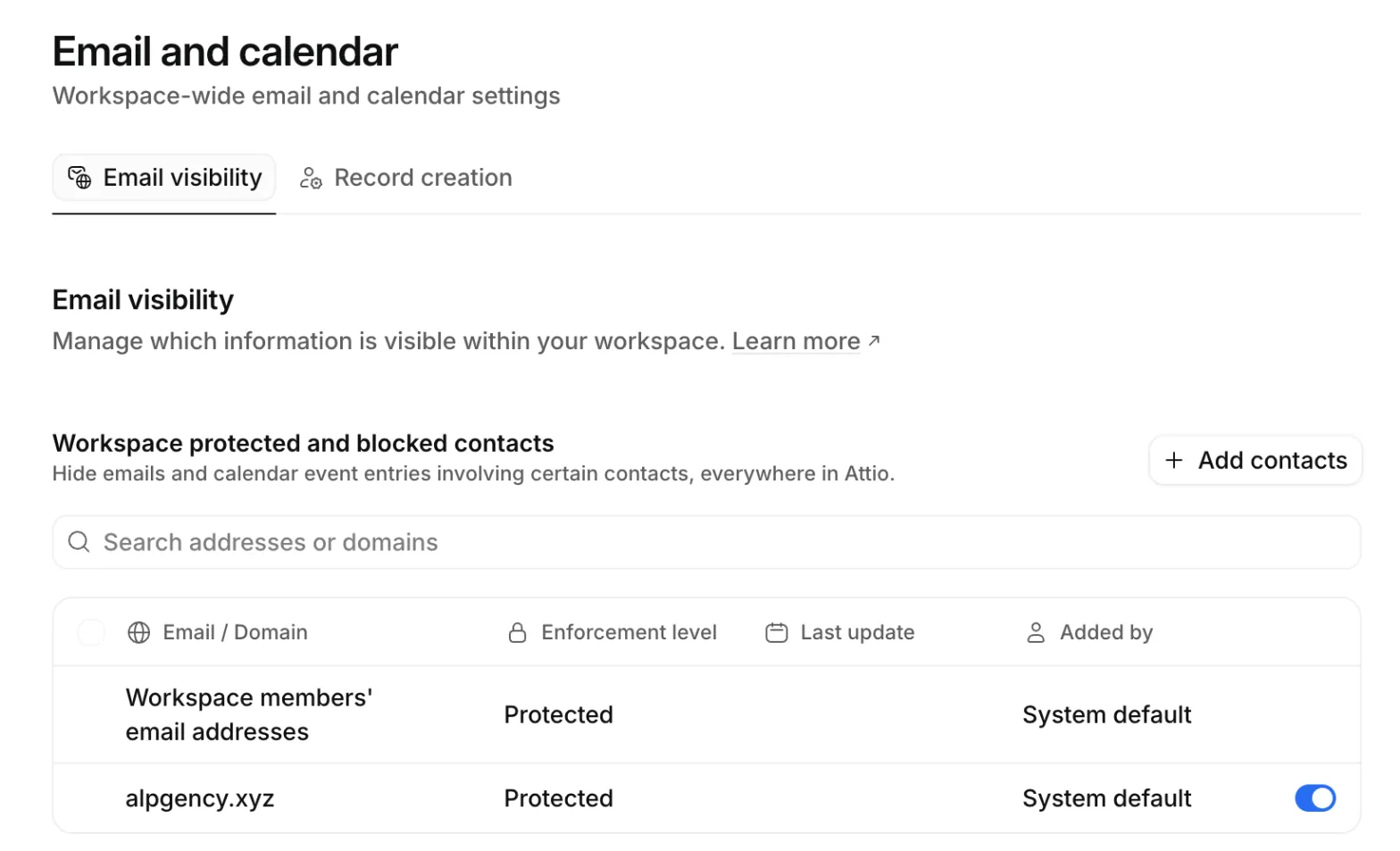
Blocklists hide a contact or a whole domain completely, where sharing levels only limit what shows. Attio has two, one for the workspace and one for each mailbox.
| Point | Workspace list: Protected | Workspace list: Blocked | Mailbox-only blocklist |
|---|---|---|---|
| Hides an email when | "Communications are hidden when all participants are Protected." | "Communications are hidden whenever a Blocked participant is included." | The contact is in a thread of that one mailbox. |
| In practice | An email between a partner and a protected address is hidden. A founder in copy makes it visible. | One blocked address hides the thread for everyone. | It "does not affect communications synced from another member's mailbox". |
| Managed by | Admins, on the protected and blocked contacts list: Workspace settings, Email and calendar, Email visibility tab | Each member: Account settings, Email and calendar accounts, the mailbox, Mailbox-only blocklist tab | |
| Entries | An email address or a domain. A domain "matches communications involving any address on that domain, including its subdomains". New entries start as Protected. | A contact | |
| Plan | Your own entries need Pro or above. Your company domain is Protected on every plan, which keeps internal mail hidden. | Every plan | |
Part 06
Does an Attio blocklist delete the email?
Attio's public pages say blocklisted email is hidden. They do not say it is deleted.
- Published
- Blocklisted email is hidden. Removing an entry "restores visibility of the associated emails and calendar events".
- Open
- No public page says the email is deleted from Attio's storage.
- Ask Attio
- If your policy bars the CRM vendor from storing privileged mail, ask in writing before you connect that mailbox.
Part 07
A recommended setup for a fund
This is the setup we start from with a fund. Adjust it to your own policy.
| Who or what | Setting | Why |
|---|---|---|
| Partners | Metadata only, or the default subject level | Their mailbox mixes deals with LP, HR and legal matters. Content moves through access requests. |
| Investment team | Subject line and metadata. Full access with workspace only for a mailbox used for deal flow alone. | Full access cannot be taken back for single emails. |
| Law firms, auditors, payroll and HR providers | Blocked, by domain, on the workspace list | Hidden even when a colleague or a founder is in copy. |
| LPs you raise from in Attio | Not on the list. Restrict content with the sharing level. | The team needs the timeline of the relationship. Attio's guidance agrees: "Leave investor domains unprotected when investors are part of the pipeline, such as at a venture capital firm." |
| LPs managed outside Attio | Protected or Blocked, by domain | No reason for the exchange to appear in the CRM. |
| Private contacts | Mailbox-only blocklist of each person | Family, doctor, personal bank. |
| Leavers | Retain email data (Plus and above), with an email access handler and a confirmed legal basis | Without it, a suspended member's synced emails and events are deleted. Calendar events tied to call recordings remain. Agree it with your counsel before the first departure. |
Part 08
What does every Attio member see, whatever the email settings?
Every member sees notes, call recordings and the records on any list, whatever the email settings say. A note on an LP's side letter is readable by all of them.
Private with the right settings
- Body and attachments, at the default level.
- Anything that includes a Blocked contact.
- Events marked private in Google Calendar or Outlook.
- Meetings with a blocked contact or only protected participants. Attio does not record them.
- A list set to No access, such as an LP fundraising list.
Visible to every member
- Notes: "always visible to and editable by everyone" (permissions page).
- Call recordings: "All call recordings are visible to all workspace members" (call recordings page).
- Calendar events, by default.
- Company and person records on a No access list.
- Every list, for admins.
Part 09
What can Attio's AI features read from email?
Attio's AI features follow the permissions of the person who uses them. A partner who uses Ask Attio gets answers drawn from their own mailbox. An associate who asks the same question does not.
| Feature | What Attio's docs say about email |
|---|---|
| Ask Attio | "Has the same viewing permissions as you. It can only access data you can normally see in Attio, including all of your own emails." (source) |
| Record summaries | "Because Subject line and metadata is the default, most summaries use email subject lines but not email bodies." (source) |
| AI attributes | Summarize record "can access all attribute values on the record, but not things like notes or emails." (source) |
| Agents in workflows | "The agent has no data by default." Emails is a tool you add. With Run as, the agent gets "access to everything that member can access". An agent that runs as a partner, with Emails added, reads what that partner reads. Treat Run as like handing over a login. (source) |
| Attio MCP | "AI assistants can only access data and take actions that you already have permission to access." (source) |
| Model training | "We don't train our own models on customer data, and we don't allow third-party AI providers to train their models on it either." (AI policy) Where the processing happens is covered in our GDPR checklist for Attio. |
FAQ
Frequently asked questions
Can an Attio admin read my emails?
Not by default. Attio states that email content is private from both admins and members by default, and that only the owner sets the sharing level of a mailbox.
Can a fund force every mailbox to "Metadata only"?
No. Attio says admins cannot set the sharing level of a mailbox, so make it a written onboarding rule and check it with each new member.
Can Ask Attio read a partner's emails when an associate asks a question?
No. Attio states that Ask Attio has the viewing permissions of the person using it, so an associate cannot reach a locked partner email through it.
Sources
Sources
All pages are Attio's own help center, checked on 19 November 2026. Plans and settings change, so confirm them in your workspace.
- Email and calendar syncing
- Sharing emails
- Keep emails and calendar events private
- Manage email and calendar privacy across your workspace
- Manage members and admins
- Sharing and permissions
- Lists access
- View and manage call recordings
- Chat with Ask Attio
- Record summaries
- AI attributes
- Workflows block library
- Attio MCP
- Attio AI policy
Check your email setup before the team connects.
In the free Attio audit we go through sharing levels, blocklists, list access and AI settings with you and write down the setup that fits your fund. If you want us to build it, you get one fixed price after the audit.
Book a free Attio auditAttio services for funds · Attio for VC funds · Attio for family offices
-

 Attio
 n8nAutomation
Attio workflows vs n8n: where each automation should run
Attio workflows vs n8n: the documented limits, credits per plan, and a decision table for each fund automation.
8 min read -
 AttioDevelopment
Attio App SDK: what you can build and when it is worth it
Record actions, widgets, pages and workflow blocks, the platform limits, and the call brief app we built as the example.
5 min read -
 AttioCompliance
Attio GDPR checklist for European funds
Hosting, DPA, sub-processors, AI and security: what Attio publishes and what to ask before you sign.
8 min read
Comparisons: Best CRM for venture capital firms, Best CRM for family offices, Attio vs DealCloud for private equity.